
BusyBusy is the most widely recognized name in construction time tracking. It built its reputation...
 The average mid-size general contractor runs 4–8 active projects simultaneously. Each project has its own crew, its own schedule, its own cost codes, and its own foreman. Without a centralized system, time tracking becomes a fragmented mess — paper timesheets collected from multiple sites, emailed photos of handwritten cards, foremen texting hours to the office admin, and a payroll coordinator spending 6–10 hours every week reconciling data that's already 3–5 days stale.
The problem compounds fast. A crew member who works at Job A in the morning and Job B in the afternoon needs split hours tracked against two projects. A foreman who supervises two simultaneous sites can't be in two places at clock-in. Sub crews working under your GC umbrella need to be tracked separately from your direct employees. And if any project crosses a prevailing wage threshold, classification by day becomes a compliance requirement, not just a preference.
Construction crew time tracking across multiple job sites requires a different approach than single-site operations — one built around GPS verification, per-site geofencing, real-time dashboards, and payroll consolidation that pulls from all sites simultaneously.
Why Multi-Site Time Tracking Breaks Down
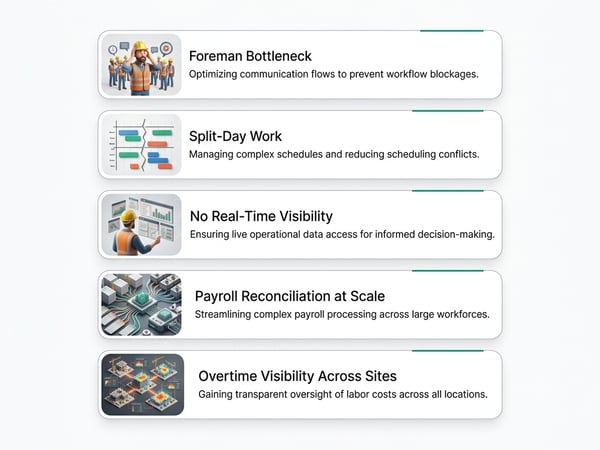
Problem 1: The Foreman Bottleneck
On a single-site operation, one foreman can verify clock-ins and collect timesheets. Across four sites, that model doesn't scale. Common failure modes:
- Foreman at Site A calls Site B foreman to get hours — hours entered from memory, not record
- One foreman covers two sites, can't verify arrival times at either
- Timesheets collected at end of week, not daily — workers estimate hours from memory
- Foreman approves time for workers they didn't physically see that day
A construction time clock app with GPS verification removes the foreman from the verification role. The GPS record proves where and when each worker clocked in — the foreman's job becomes exception review, not primary documentation.
Problem 2: Split-Day Work
A worker drives from Site A to Site B mid-day. Both projects need accurate labor cost allocation. On paper timesheets, the worker estimates: "4 hours at Site A, 4 hours at Site B." That estimate is wrong more often than it's right.
With GPS tracking, the worker clocks out of Site A's geofence when they leave and clocks into Site B's geofence when they arrive. The system records exact time at each site — no estimation. Job costing for both projects gets accurate data automatically.
Problem 3: No Real-Time Visibility
A project manager overseeing three active projects has no idea who showed up at each site today without calling every foreman. By the time calls are made and hours are tallied, it's often too late to act on the information — the site that ran short-handed has already lost half a day of production.
Problem 4: Payroll Reconciliation at Scale
Collecting paper timesheets from five job sites, transcribing them into payroll, and cross-referencing against schedules takes 8–12 hours per payroll cycle for a company running 25–40 field employees across multiple projects. Errors in transcription are routine. Disputed hours surface after payroll has already been processed.
Problem 5: Overtime Visibility Across Sites
A worker doing 25 hours at Site A and 20 hours at Site B in a single workweek has hit 45 hours. If the Site A foreman and Site B foreman are submitting hours independently without a consolidated view, neither knows the worker is in overtime territory until payroll — at which point the overtime has already happened. See Construction Time Card Laws by State for overtime triggers and state-specific rules.
The GPS Solution for Multi-Site Operations
Per-Site Geofencing
Each job site gets its own geofence — a GPS-defined boundary that enables clock-ins only when workers are physically on that site. Setup takes 2 minutes per site: drop a pin on the site location, set the radius (50–300 feet depending on site size), name it.
What per-site geofencing enables:
- Workers can only clock into a site when they're physically there — no clocking in from home for a site they plan to visit later
- Split-day work is captured automatically — clock out of Site A when leaving, clock in at Site B when arriving
- Project managers see live crew counts per site without calling anyone
- Payroll automatically sorts hours to the correct project based on which geofence the clock-in happened inside
Geofence sizing: Residential remodel sites and small commercial work: 50–100 foot radius. Large commercial or civil sites: 200–500 feet. Be precise — if the geofence is too large, workers can clock in from the street or parking lot. If too small, workers near the edge of a large site get false "outside geofence" errors.
Real-Time Multi-Site Dashboard
A contractor time tracking app with multi-site support gives superintendents and PMs a live view:
- How many workers are clocked in at each site right now
- Which specific workers are at which site
- Who has been clocked in for how long
- Who is scheduled but hasn't clocked in yet
- Any alerts (outside geofence clock-in, approaching overtime, missing clock-out)
This dashboard replaces the morning phone calls to foremen. A superintendent managing four sites sees the status of all four in 30 seconds.
For landscaping and outdoor crews operating across many small residential job sites in a single day, the same GPS multi-site model applies — see Time Tracking for Landscapers for how GPS crew tracking works for route-based operations.
Tracking Workers Who Move Between Sites
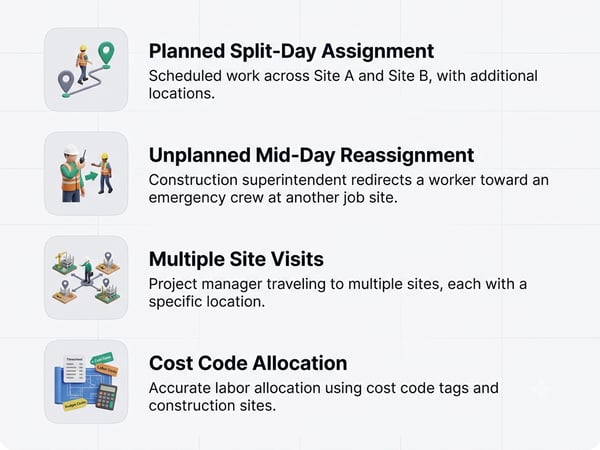
Workers who split their day across multiple job sites are the most complex time tracking scenario. Three scenarios:
Scenario A: Planned split-day assignment Worker is scheduled 7am–11am at Site A, 12pm–4pm at Site B. Set up both assignments in the schedule. Worker clocks out of Site A, drives to Site B, clocks in at Site B. System records both accurately.
Scenario B: Unplanned reassignment mid-day Superintendent calls a worker from Site A to Site B to handle an emergency. Worker clocks out of Site A when they leave. Supervisor at Site B or the worker themselves logs the reason for the transfer in the app's notes field. Worker clocks in at Site B. Job costing for both sites is accurate.
Scenario C: Worker visits multiple sites briefly A superintendent or project manager visits 4 sites in a day, spending 1–2 hours at each. If using GPS-based automatic clock-in/out (triggered by entering and leaving geofences), the system records each site visit. If manual clock-in is required, the superintendent clocks in and out at each site deliberately.
Cost code allocation: When a worker splits time across sites in a single day, their hours need to be allocated not just by project but by cost code. A construction timesheet app should allow workers to select both the job and the cost code at clock-in. See Construction Job Costing for how to set up cost codes that work across multiple projects.
Tracking Sub Crews on Your Sites
When subcontractors bring their own crews to your job sites, you face a different tracking challenge: you need to verify sub presence and hours for coordination purposes without running their payroll through your system.
Why track sub presence at all:
- Coordination — know which subs are on site to avoid sequencing conflicts
- Documentation — daily log showing which subs were working, which weren't, supports delay claims
- Safety — site safety plan requires knowing who is on site at all times
- Back-charge defense — if a sub claims they couldn't work because your crew blocked access, your GPS records show your crew wasn't in their work area
Two approaches:
Visitor/sub clock-in: Some construction time tracking apps support a separate "visitor" or "sub crew" clock-in track — sub workers clock into the site geofence on their own devices, generating a presence record that you can see but that doesn't feed your payroll.Foreman daily log: The simpler approach — foreman records sub presence in the daily report. Not GPS-verified but creates a documented record. See Construction Daily Report Template for daily log format.
For vetting and onboarding subs before they work your sites, see Construction Subcontractor Prequalification.
Overtime Management Across Multiple Sites
Multi-site operations create overtime risk that's invisible without a consolidated view. The overtime calculation is based on total hours across all projects in the workweek — not per-project hours.
The problem:
- Site A foreman approves 22 hours for Worker X
- Site B foreman approves 22 hours for Worker X
- Neither knows about the other's approval
- Worker X hits 44 hours — 4 hours overtime — and neither foreman flagged it
The solution:
A centralized construction employee time tracking app aggregates all hours across all sites in real time. When Worker X's total weekly hours across all projects approach 35–38 hours (configurable alert threshold), the system flags it. The superintendent sees the alert before overtime is incurred — and can decide whether to authorize it or reassign hours to a worker with lower weekly totals.
Overtime authorization workflow:
- System alerts supervisor when worker approaches overtime threshold (configurable: typically 35–38 hours)
- Supervisor reviews and either approves overtime or reassigns
- If overtime approved: documented with reason code
- Payroll processes with overtime calculated across all site hours for the week
California daily overtime across sites: A California worker doing 6 hours at Site A and 6 hours at Site B in a single day has worked 12 hours. California requires 1.5× for hours 9–12 and 2× for hours over 12 — regardless of the fact that the hours split across two projects. Your system must calculate daily totals across all sites to catch this. See Construction Time Card Laws by State for state-specific daily overtime rules.
Cost Code Tracking Across Multiple Projects
For accurate job costing, every hour worked needs to be tagged to a specific project and cost code. Across multiple sites, this requires workers to select their job assignment and trade classification at every clock-in.
Best practice setup:
- Create a project in the time tracking system for each job site
- Assign cost codes to each project (03-L concrete labor, 06-L framing labor, etc.)
- Workers select project + cost code at clock-in
- System validates that the selected project matches the worker's GPS location (catches workers who accidentally select the wrong job)
What this produces:
- Real-time budget vs. actual labor by project
- Accurate job cost reports without manual reallocation
- Feed to payroll that includes job and cost code for each hour
See Construction Job Costing for full cost code structure and budget vs. actual setup.
Payroll Consolidation From Multiple Sites
The final piece: taking time data from all sites and producing a single, accurate payroll run.
Manual process (what not to do):
- Collect paper timesheets from 5 sites — 3–5 day lag
- Transcribe into payroll manually — 8–10 hours
- Reconcile discrepancies by phone — 2–3 hours
- Calculate overtime across all sites manually — error-prone
- Process payroll — 3–5 days after work period
App-based process:
- Workers clock in and out with GPS verification — real time
- Supervisors approve timesheets from mobile within 24 hours
- Payroll export generated at end of pay period — 10 minutes
- Import directly to QuickBooks, ADP, Gusto, or Paychex
- Payroll processes with complete, verified data
Time saved: 8–12 hours per payroll cycle. Error rate: near zero on transcription. Data lag: zero — payroll works from same-day data.
For choosing the right construction time keeping software for multi-site payroll integration, confirm the app exports in your payroll provider's format before committing. Common integrations: QuickBooks Online/Desktop, ADP, Gusto, Paychex, Sage.
What to Look for in a Multi-Site Construction Time Tracking App
Not every time card app for construction handles multi-site operations well. Features that matter specifically for multi-project contractors:
|
Feature |
Why It Matters for Multi-Site |
|
Unlimited geofences |
One per job site — can't be capped |
|
Per-project cost code assignment |
Workers select job + code at clock-in |
|
Consolidated overtime view across all projects |
Critical for overtime management |
|
Multi-site crew dashboard |
See all sites in one view |
|
Supervisor hierarchy |
Foremen see their sites; PMs see all sites |
|
Bulk worker assignment |
Reassign workers between sites quickly |
|
Offline mode with sync |
Dead cell zones on active sites |
|
Export by project or by employee |
Both views needed for payroll and job costing |
|
Alert customization by project |
Different overtime thresholds, different notification recipients |
|
Audit trail by project |
Complete GPS-verified record per job |
For a comparison of leading apps against these criteria, see Top 5 Construction Time Tracking Apps and Top 5 BusyBusy Alternatives. For a direct comparison of TaskTag's multi-site capabilities, see TaskTag vs. BusyBusy.
Rollout for Multi-Site Operations
Rolling out construction crew time tracking across multiple simultaneous projects requires sequencing:
Week 1: System setup
- Create projects in the app for all active job sites
- Configure geofences for each site
- Set up cost codes per project
- Configure overtime alert thresholds by state
Week 2: Foreman training
- Train each site foreman on the crew dashboard for their site
- Train them on exception handling (manual entry for device failure, etc.)
- Establish approval deadline — foremen approve prior day's time by 9am
Week 3: Pilot on 1–2 sites
- Run the app alongside paper timesheets at 2 sites
- Reconcile GPS data against paper at week end
- Expect 10–20% discrepancy rate — investigate each one
Week 4: Full cutover
- All sites move to app-only
- Paper timesheets no longer accepted for payroll
- Payroll coordinator processes from app export only
- First full-cycle reconciliation: compare payroll hours to foreman headcounts
Months 2–3:
- Refine geofence boundaries based on false alerts
- Tune overtime thresholds based on first cycles
- Review job cost data accuracy against estimates
- Retire paper processes entirely
Multi-Site Time Tracking Checklist
System configuration:
- [ ] Separate project created for each active job site
- [ ] Geofence set for each site with correct radius
- [ ] Cost codes assigned to each project
- [ ] Workers assigned to correct projects (can be multiple)
- [ ] Overtime thresholds set per state for each project
- [ ] Supervisor hierarchy configured (foreman → superintendent → PM)
Daily operations:
- [ ] Real-time crew dashboard reviewed each morning by superintendent
- [ ] Missing clock-ins addressed before end of workday
- [ ] Split-day assignments tracked with clock-out/clock-in at each site
- [ ] Foreman approves prior day's time before 9am cutoff
Payroll cycle:
- [ ] Overtime alerts reviewed and resolved before payroll close
- [ ] All hours approved by site foremen
- [ ] Consolidated payroll export generated
- [ ] Hours reconciled against scheduled headcount per site
- [ ] Export imported to payroll system — no manual transcription
Ongoing:
- [ ] Weekly job cost labor actuals reviewed per project
- [ ] Monthly: actual vs. budget labor comparison per site
- [ ] Quarterly: geofence accuracy review, false-alert rate
- [ ] Annual: system cost vs. payroll savings ROI review
Related Resources
TaskTag Features and Comparisons
- GPS Time Tracking for Construction — multi-site geofencing, crew dashboards, GPS clock-in
- Construction Time Tracking Software Guide — full guide to evaluating multi-site capable apps
- Time Tracking for Construction Workers — field worker experience on multi-site operations
- Top 5 Construction Time Tracking Apps — multi-site feature comparison
- Top 5 BusyBusy Alternatives — alternatives with multi-site and multi-project support
- TaskTag vs. BusyBusy — multi-site capability comparison
- Time Tracking for Landscapers — GPS tracking for route-based multi-site crews
Related Blog Posts
- Construction Job Costing — cost code setup and budget vs. actual tracking per project
- How to Stop Payroll Theft on Construction Job Sites — GPS verification and buddy punching prevention
- Construction Time Card Laws by State — overtime rules, prevailing wage, and certified payroll by state
- Construction Subcontractor Prequalification — vetting sub crews before they work your sites
- Construction Daily Report Template — daily site log format for documenting sub presence and crew counts
- Construction Project Schedule — coordinating multi-site crew scheduling
- How to Hire Construction Workers — onboarding workers for multi-site operations
- Contractor Profit and Loss Statement — how multi-site labor data rolls up to company financials
- Construction Cash Flow Management — payroll timing across multiple simultaneous projects
- Construction Overhead and Profit — allocating overhead across multiple active projects