
 Houzz Pro is built around the sales and design side of a project: leads, mood boards, selections, proposals, and client communication. Landscape and outdoor contractors, including design-build firms, hardscape crews, irrigation installers, and maintenance companies, often find that the part of their business that bleeds money is the part Houzz Pro does not cover: where the crews are, what the hours cost, and whether a job is making money.
This guide covers what Houzz Pro does well for outdoor contractors, where the gaps are for landscape crews specifically, and what to look for in an alternative or an add-on. Confirm current Houzz Pro features and pricing directly with the vendor, since plans change. For a broader platform comparison, see top Houzz Pro alternatives.
What Houzz Pro Does Well for Outdoor Work
Keep what works. Replace only what does not.
Houzz Pro is popular with design-build and residential outdoor contractors because it helps with the front end:
- Lead generation and exposure to homeowners planning outdoor projects
- Portfolio and reviews that show finished patios, gardens, and pools
- Client communication in one portal
- Proposals and selections such as plants, pavers, lighting, and furniture
- Design visuals that help clients picture the finished space
- Invoicing and payment collection
If these functions bring you work and close sales, they are worth keeping. The question is what you use once the proposal is signed and the trucks roll.
Where Landscape Crews Outgrow a Sales-Side Tool
Landscape operations have patterns that general project and design tools do not handle well. Check each against what you use now.
Crews work multiple sites in a day. A maintenance crew may visit six properties. A design-build crew may split between a patio install and a planting job. Hours need to land on the right property automatically.
Seasonal and high-turnover labor. Many outdoor companies hire fast in spring and release in fall. Onboarding has to take minutes, and records need to be clean for each short-term worker.
Mobile, outdoor, spread-out work. Phones get dirty, wet, and dropped. Cell signal is spotty on large properties and rural sites. The app needs to work offline.
Recurring and one-time work together. Maintenance contracts repeat weekly. Installs are one-time. Job costing has to handle both.
Equipment and materials matter. Mowers, skid steers, trucks, mulch, stone, and plants are significant costs. Time on equipment and material usage affect margin.
Weather controls the schedule. Rain days shift whole weeks. You need quick rescheduling and a record of lost days.
Thin margins in maintenance. Small time errors on recurring routes add up quickly across a season.
None of this is what a client-facing design and proposal tool is built to track.
GPS Time Tracking for Landscape Crews
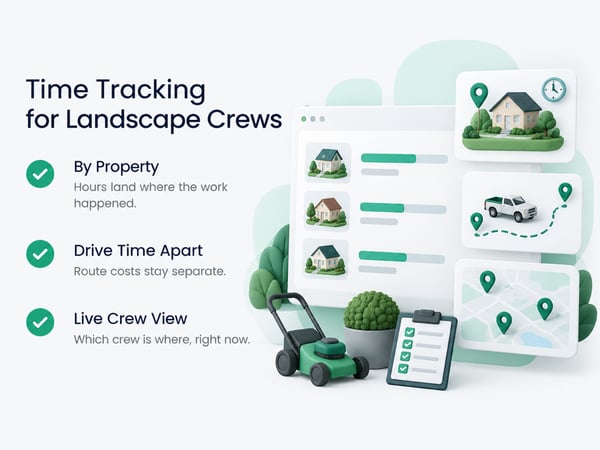
For crews that move between properties, location-verified time is the foundation of everything else.
With GPS time tracking and geofences around each property:
- Workers clock in when they arrive at a property, and hours attach to that property automatically
- Drive time between sites can be tracked separately from on-site time
- You can see from the office which crew is at which property right now
- Late starts, early departures, and extra stops show up the same day
- Payroll and overtime are calculated from real hours
- Records support customer billing and dispute resolution
For maintenance routes, this answers a question most owners cannot currently answer: how long does each property really take? If you priced a property at 45 minutes and crews average 70, you find out in a week and not at year end.
See time tracking for landscapers for outdoor crew patterns, and time tracking for construction workers for the crew-level setup process.
Job Costing by Property and by Phase
Landscape profit hides in the details: a job that looks fine in total may be losing money on one phase.
For design-build projects, track labor by phase:
|
Phase |
Example cost codes |
|---|---|
|
Site prep |
Demo, clearing, grading |
|
Hardscape |
Base prep, pavers, walls, steps |
|
Irrigation |
Trenching, lines, heads, controller |
|
Drainage |
Trenching, pipe, grading |
|
Planting |
Bed prep, plants, trees, sod |
|
Lighting and electrical |
Trenching, fixtures, wiring |
|
Finish work |
Mulch, cleanup, touch-ups |
|
Change orders |
Extra work, separate from scope |
|
Weather delay |
Standby time |
For maintenance routes, track by property and by service type: mowing, trimming, edging, blowing, bed care, seasonal cleanups, irrigation checks, and extras billed separately.
After a season, compare actual hours per property to what you quoted. The properties that run long are either mispriced or being handled inefficiently. Either way, you now know. See how to win construction bids for pricing from historical data, and contractor profit and loss statement for margin reporting.
Seasonal Hiring Without the Paperwork Mess
Spring hiring surges are where record keeping breaks down. A strong process lets you onboard a new worker in minutes.
Seasonal onboarding checklist:
- [ ] Add the worker with legal name and payroll ID matching your payroll system
- [ ] Set pay rate and overtime classification
- [ ] Send login by text with a one-page setup guide
- [ ] Verify location permission on their phone
- [ ] Supervise their first clock-in
- [ ] Assign them to the right crew and properties
- [ ] At season end, deactivate the account and archive records
Do not skip the first supervised clock-in. A worker who is shown how to clock in and which cost code to choose uses the system correctly from day one. For a complete setup sequence, see construction time tracking software.
Equipment and Materials Tracking
Equipment and materials are real costs, and they hide inside a lump sum if you do not track them.
Practical steps:
- Track machine hours for skid steers, trenchers, and mowers where they affect job cost
- Assign equipment to jobs so costs flow to the right place
- Log material deliveries against the job budget: stone, soil, mulch, plants, pipe
- Record returns and waste so overages show up
- Track plant material warranties and replacements as their own cost line
Even a simple log beats nothing. Over a season it shows where margin leaks, such as consistent over-ordering of mulch or stone. See construction WIP report for tracking job profitability while work is underway.
Photos and Documentation for Outdoor Work
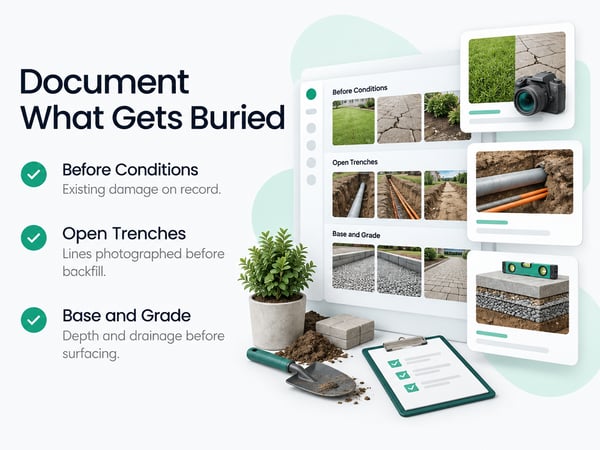
Outdoor work needs documentation too, because some of it disappears underground or grows over.
Photograph:
- Before conditions, including existing damage to turf, hardscape, and structures
- Trenches before backfill: irrigation lines, drainage, electrical, and lighting
- Base preparation for patios and walls, showing depth and compaction
- Grade and drainage direction before final surfacing
- Plant material at delivery and at installation
- Final results from consistent angles
These records help in disputes about drainage, settling, plant failure, or damaged property. See construction defect claims for how documentation supports your position, and the field inspection workflow for how checklists and photos combine into one record.
Weather, Scheduling, and Lost Days
Rain, frost, heat, and drought rearrange the calendar. Track it so you can plan and bill fairly.
- Record weather impact each day: hours lost and cause
- Use a separate cost code for weather standby time
- Reschedule crews quickly, and notify customers early
- Keep a record that supports schedule extensions under your contract
- Track seasonal patterns: which weeks are most often lost in your area
When delays affect larger projects, the record matters. See construction project delay for how documentation supports schedule claims, and how to negotiate a construction contract for weather and delay clauses.
Keep and Add: The Practical Setup
Most outdoor contractors do best keeping Houzz Pro's sales strengths and adding a field operations tool.
|
Function |
Where it lives |
|---|---|
|
Lead generation and portfolio |
Houzz Pro (keep, if it brings work) |
|
Proposals, selections, and design visuals |
Houzz Pro (keep) |
|
Client communication |
Houzz Pro or email and text |
|
GPS crew time tracking |
Field tool (add) |
|
Labor by property and phase |
Field tool (add) |
|
Payroll export |
Field tool (add) |
|
Photos and inspections |
Field tool (add) |
|
Accounting |
QuickBooks or equivalent |
Match cost codes across tools so labor lines up with the proposal. If you decide to replace more than the field side, evaluate options against your must-haves using the top Houzz Pro alternatives comparison and a structured trial. For platform comparisons covering time tracking, see top 5 time tracking apps, top 5 BusyBusy alternatives, and TaskTag vs. BusyBusy.
What to Look for in an Alternative
Use this list in demos. Landscape contractors have specific needs.
Must-have
- GPS clock-in with geofences for multiple properties
- Offline mode that syncs reliably
- Fast onboarding for seasonal workers
- Cost codes by phase and by service type
- Payroll export with correct overtime handling
- Mobile-first design that works with gloves, glare, and one hand
- Clear pricing for fluctuating headcount
Strong value
- Equipment and material tracking
- Photo documentation with timestamp and location
- Customer-ready reports
- Recurring job and route support
- Foreman clock-in for crew members without smartphones
- Role-based access for subs and seasonal staff
Questions to ask
- How do you price seasonal workers who are active only a few months?
- Can I deactivate and reactivate users without losing records?
- Show me offline clock-in on a large property with no signal
- Show me hours by property for a maintenance route
- Show me a payroll export with overtime into my payroll system
A 14-day trial with real crews is the most reliable way to evaluate. Use a scorecard so the decision rests on evidence.
Pricing Maintenance Work From Real Data
Maintenance contracts are won and lost on accurate time estimates.
After 4 to 6 weeks of tracking:
- Average on-site minutes per property by service type
- Drive time between stops
- Variation by crew
- Seasonal changes: spring cleanup vs. summer mowing
Use that to reprice underwater accounts, adjust route order, and quote new properties with confidence. A property you quoted at 45 minutes that takes 70 is costing real margin every visit. Even small corrections across dozens of properties change your annual profit. Track the cash side too. See construction cash flow management for managing seasonal swings.
Closeout for Design-Build Projects
Design-build outdoor projects need the same closeout discipline as any construction job.
- [ ] Final walkthrough with the client and a punch list, with photos and due dates
- [ ] Irrigation walkthrough: zones, controller programming, seasonal shutoff instructions
- [ ] Plant care guide and warranty terms in writing
- [ ] Lighting and electrical operation confirmed
- [ ] As-built photos of buried lines and drainage
- [ ] Signed completion sign-off
- [ ] Final invoice and payment
See construction project closeout for the full closeout process, and construction retainage for commercial and public projects where retainage applies.
One-Page Checklist
Decide
- [ ] Which Houzz Pro functions are working and worth keeping
- [ ] Where profit is leaking: travel time, over-long properties, change orders, or labor
- [ ] Whether I need an add-on or a full replacement
Set up
- [ ] Geofences for each property or job site
- [ ] Cost codes by phase and service type
- [ ] Seasonal onboarding process with supervised first clock-in
- [ ] Offline mode tested at the worst-signal property
- [ ] Payroll export tested
Run
- [ ] Daily crew dashboard check
- [ ] Weekly hours by job and property reviewed
- [ ] Photos taken before covering underground work
- [ ] Weather delays logged separately
Improve
- [ ] Reprice properties that consistently run long
- [ ] Review phase costs after each design-build job
- [ ] Use data in next season's bids
Related Resources
Houzz Pro Alternatives:
- Top Houzz Pro Alternatives: platform comparison and rankings
TaskTag Features:
- GPS Time Tracking for Construction: verified clock-in by property
- Time Tracking for Landscapers: tracking for mobile outdoor crews
- Construction Time Tracking Software: platform overview and setup
- Time Tracking for Construction Workers: crew clock-in guide
- Top 5 Time Tracking Apps: platform comparison
- Top 5 BusyBusy Alternatives: alternatives guide
- TaskTag vs. BusyBusy: feature comparison
- Field Inspection Workflow: checklists and photos together
Related Blog Posts:
- How to Win Construction Bids: pricing from historical data
- Contractor Profit and Loss Statement: margin reporting
- Construction WIP Report: active job profitability
- Construction Cash Flow Management: seasonal cash planning
- Construction Project Delay: weather and delay documentation
- How to Negotiate a Construction Contract: weather and change order clauses
- Construction Defect Claims: documentation in disputes
- Construction Project Closeout: closeout for design-build work
- Construction Retainage: retainage on larger projects