

 BusyBusy built its reputation as the construction time tracking app — GPS clock-in, crew dashboard, basic job costing, clean mobile interface. For contractors running a small crew on straightforward residential work, it still covers the basics. But as companies grow past 10–15 field workers, add commercial jobs with certified payroll requirements, or start needing real-time job cost reporting rather than hour totals, BusyBusy's limitations become the bottleneck.
The contractors switching away from BusyBusy in 2026 aren't unhappy with GPS time tracking as a concept. They're unhappy that BusyBusy's version of it stopped keeping pace with what their business actually needs. This guide covers the specific reasons contractors are making the switch, what to look for in a replacement, and how to evaluate alternatives without switching twice.
The Switching Triggers: What Contractors Report
Contractors who switch from BusyBusy in 2026 consistently cite the same four friction points. None of them appeared at initial setup — they surfaced as the business scaled.
Friction 1 — Pricing That Doesn't Scale Well
BusyBusy's pricing model has evolved from flat-rate simplicity to tiered plans that layer features behind higher tiers. Contractors who signed up for straightforward GPS time tracking find that the features they actually need — advanced reporting, payroll integrations, equipment tracking, more detailed job costing — sit behind plan upgrades that weren't part of the original cost model.
For a company that started with BusyBusy at $150/month and finds itself needing to upgrade to $350–500/month to access features that competitors include at the base tier, the switching calculus becomes straightforward.
The practical question when evaluating any BusyBusy alternative: ask to see the full feature list at the price point you're actually going to pay — not the entry plan, not the enterprise plan, the plan a 15-person construction crew would realistically need on day 60.
Friction 2 — Job Costing That Doesn't Go Deep Enough
BusyBusy tracks time by job and by cost code. That's the foundation of construction time tracking. The problem is what it doesn't do with that data.
Contractors who need more than "hours by cost code per job" — who need actual vs. estimated cost by phase, real-time cost-to-complete, job cost comparison across similar projects, or cost code budget alerts — find that BusyBusy's job costing module stops at the surface.
Specifically: BusyBusy doesn't natively carry a budgeted cost per cost code that it compares to actual in real time. The time is tracked. The budget comparison requires export and external calculation — usually a spreadsheet that someone updates weekly, which defeats the purpose of the software.
What deep job costing looks like:
- Budgeted hours and cost per cost code loaded at project setup
- Actual hours updating against budget in real time as crew clocks in
- Alert when actual approaches or exceeds budget on any cost code
- Cost-to-complete projection based on remaining scope
- Comparison across multiple jobs with the same cost code (what does framing actually cost per square foot, averaged across the last 8 projects?)
That data is what improves bids. See how to win construction bids for how historical job cost data feeds estimate accuracy, and contractor profit and loss statement for how job cost data rolls up into financial reporting.
Friction 3 — Payroll Integration Gaps
BusyBusy exports to QuickBooks. For contractors on QuickBooks, that works. For contractors on ADP, Paychex, Gusto, Sage, or any other payroll system, the export story gets complicated.
The workaround is manual: export a CSV from BusyBusy, reformat it to match the payroll system's import template, import it, reconcile discrepancies. On a crew of 20 workers across 5 jobs, this is 3–4 hours of payroll admin work every cycle — work that software was supposed to eliminate.
What a complete payroll integration looks like:
- Native two-way sync with QuickBooks Payroll (not just QuickBooks Desktop)
- ADP and Paychex import template export in the correct column format
- Gusto direct integration
- Certified payroll report generation for prevailing wage projects
- Overtime calculation against state-specific rules applied at export
For contractors on any payroll platform other than QuickBooks, "does BusyBusy integrate with [your payroll system]?" is the question to ask before a free trial ends. See construction time tracking software for the full payroll integration guide.
Friction 4 — Reporting That Requires Too Much Manual Work
BusyBusy produces time reports. What growing construction companies need are business intelligence reports — and the gap between those two things is where the frustration lives.
Time reports show who worked when and for how many hours. Business intelligence reports show:
- Labor cost as a percentage of revenue by job
- Which cost codes consistently run over budget
- Which superintendents have the tightest variance between estimated and actual crew hours
- Month-over-month labor efficiency trend across the company
- Project margin contribution in real time
BusyBusy can't produce most of these without exporting to Excel and building them manually. The export works — but any time tracking software can export to Excel. The value of the software is what it shows you without the spreadsheet.
For what financial reports should look like downstream of time tracking data, see construction WIP report and construction cash flow management.
What Contractors Need From a BusyBusy Alternative
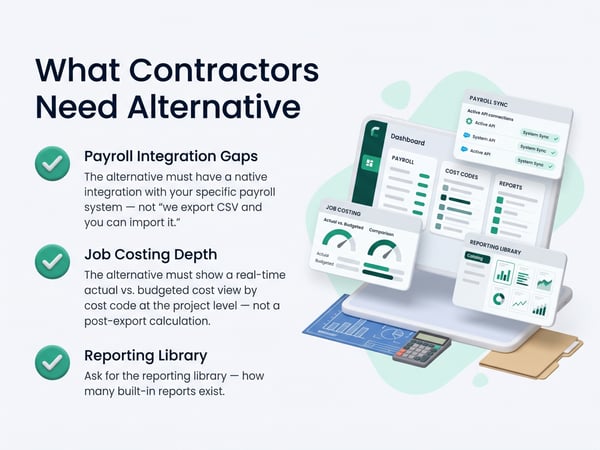
The switch from BusyBusy is most successful when the contractor identifies which of the four friction points drove the decision — and verifies the alternative actually solves that specific friction, not just adds features around it.
For payroll integration gaps:
The alternative must have a native integration with your specific payroll system — not "we export CSV and you can import it." Verify this in a demo by watching an actual payroll export and import cycle. Ask what happens when a worker's hours import with the wrong overtime calculation. Ask what happens when an employee ID doesn't match between systems.
See top 5 BusyBusy alternatives for a side-by-side payroll integration comparison and TaskTag vs. BusyBusy for the direct feature breakdown.
For job costing depth:
The alternative must show a real-time actual vs. budgeted cost view by cost code at the project level — not a post-export calculation. Ask the vendor to show you what the job cost dashboard looks like mid-project on an active job, not a demo project with clean round numbers.
For reporting:
Ask for the reporting library — how many built-in reports exist, what data they pull from, and whether they update in real time or require a manual refresh. Then ask which reports require an export to produce. The ratio tells you how much Excel the software replaces vs. how much it just feeds.
For pricing at scale:
Get the cost for your actual expected user count, your actual feature needs, and your actual support tier — and get it in writing before the free trial ends. The month-1 price is rarely the month-13 price when features are tiered.
GPS Time Tracking: Where the Comparison Gets Specific
Both BusyBusy and its alternatives use GPS clock-in. The differences are in accuracy, geofence enforcement, and what happens when the GPS record is contested.
GPS accuracy on remote and rural job sites: GPS accuracy degrades in areas with poor cellular coverage and limited GPS satellite visibility — exactly the conditions on many construction sites. BusyBusy relies primarily on device GPS with cellular-assisted location. Alternatives that use multi-source location (GPS + Wi-Fi + cellular triangulation) produce more accurate records on sites where device GPS alone is unreliable.
Geofence enforcement options: BusyBusy offers geofencing — the ability to define a job site boundary and flag clock-ins outside it. The policy options for what happens at a geofence violation vary by platform. Some flag and notify. Some hard-block and require supervisor override. Some log the discrepancy for review without real-time action.
What happens when a record is disputed: When a worker disputes their GPS clock-in — "I was on site, the GPS was wrong" — the platform needs to show the superintendent exactly what the record shows: coordinates, accuracy radius, device ID, timestamp. A record that shows coordinates with a 50-meter accuracy radius is very different from one with a 5-meter radius, and the documentation behind the dispute matters as much as the geofence enforcement.
See GPS time tracking for how GPS accuracy, geofencing, and dispute documentation work in an integrated platform.
BusyBusy vs. Alternatives: Feature Comparison
|
Feature |
BusyBusy |
What alternatives add |
|---|---|---|
|
GPS clock-in |
Yes |
Varies by platform |
|
Geofencing per job |
Yes |
More enforcement options |
|
Real-time crew dashboard |
Yes |
More filtering and drill-down |
|
Cost codes per job |
Yes |
Budget vs. actual comparison |
|
Real-time job cost reporting |
Limited |
Full actual vs. budgeted by phase |
|
QuickBooks integration |
Yes |
Some add ADP, Paychex, Gusto |
|
Certified payroll |
Limited/add-on |
Native on some platforms |
|
Equipment time tracking |
Yes |
Varies |
|
Photo documentation |
Limited |
Varies — some integrated, some not |
|
Inspection checklists |
No |
Some platforms include |
|
Offline mode |
Yes |
Varies by platform |
|
Subcontractor user access |
Limited |
Varies |
|
Reporting depth |
Basic |
Varies significantly |
The platforms worth evaluating as BusyBusy alternatives are listed with full feature breakdowns at top 5 BusyBusy alternatives. For a direct TaskTag comparison, see TaskTag vs. BusyBusy.
The Migration Process: What to Expect
Switching time tracking software mid-project is possible but requires a clean cutover plan. The worst outcome is running two systems in parallel "just in case" — workers default to whichever system requires less effort, records split between platforms, and the migration never actually completes.
Migration timeline for a 15–20 person crew:
Week before cutover:
- All projects created in the new system with correct names and job numbers
- Cost codes loaded per project
- Geofences drawn and tested
- All workers added with names and IDs matching payroll system exactly
- Superintendents and foremen trained on the new dashboard
- Payroll integration configured and test export completed
Cutover day:
- Paper timesheets and old app retired — not "optional for now"
- All workers clock in on the new app, supervised first clock-in
- Superintendent confirms all workers clocked in before work starts
- Old app access not revoked for 30 days — reference only, no new records
First pay cycle:
- Run payroll from new system
- Compare output to last BusyBusy export as sanity check
- Any discrepancies identified and resolved before the second cycle
After 30 days:
- Old app access revoked
- Migration complete
For the detailed day-by-day setup guide, see construction time tracking software and time tracking for construction workers.
Questions to Ask Before Committing to Any BusyBusy Alternative
The free trial period is the time to verify the specific friction points that drove the switch — not to explore features you won't use.
Payroll integration:
- Watch a complete payroll export and import cycle on your actual payroll system
- Ask what happens when an employee ID doesn't match
- Ask what the certified payroll report looks like if applicable to your work
Job costing:
- Ask to see actual vs. budgeted cost by cost code on a mid-project job
- Ask how budget loading works — do you enter budgeted hours, dollars, or both?
- Ask how the system handles cost code changes mid-project when scope shifts
GPS accuracy:
- Take the app to a job site with poor cellular coverage and test a clock-in
- Ask to see what the dispute documentation looks like for a flagged GPS record
- Test the offline mode — clock in without connectivity and verify the record syncs correctly
Pricing:
- Get the year-two price in writing, not just the promotional year-one rate
- Ask which features are add-ons vs. included at your plan level
- Ask what happens to your data if you cancel — export format and timeline
What Good Time Tracking Looks Like After the Switch
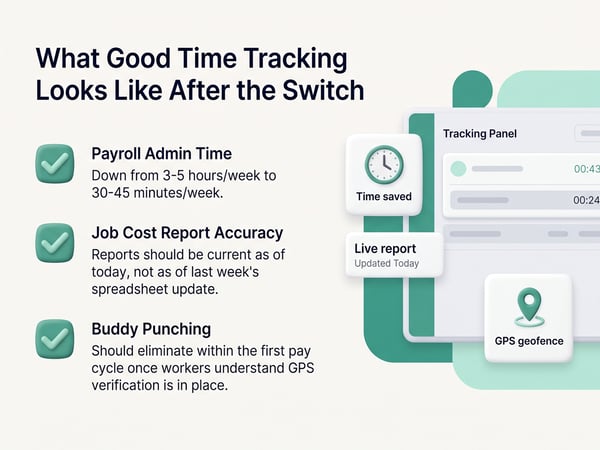
The benchmark for a successful migration from BusyBusy isn't feature count — it's operational change. After 60 days on the new system, these metrics should be measurably different:
Payroll admin time: Down from 3–5 hours/week to 30–45 minutes/week. If payroll admin time hasn't changed, the payroll integration isn't working correctly.
Job cost report accuracy: Reports should be current as of today, not as of last week's spreadsheet update. If job cost reporting still requires a manual export and calculation step, the system isn't providing real-time job costing.
Overtime disputes: Should be near-zero. GPS-verified clock-in records with clear timestamps are the documentation that resolves overtime disputes before they become claims. If disputes continue at the same rate as BusyBusy, the GPS documentation quality may not have improved.
Buddy punching: Should eliminate within the first pay cycle once workers understand GPS verification is in place. If buddy punching continues, the geofencing isn't enforced or the GPS accuracy is insufficient.
For more on top time tracking apps and the full platform selection process, see top 5 BusyBusy alternatives. For landscaping and exterior crews with specific GPS tracking needs, see time tracking for landscapers.
Related Resources
TaskTag Comparison and Features:
- Top 5 BusyBusy Alternatives — full feature comparison and platform rankings
- TaskTag vs. BusyBusy — direct side-by-side comparison
- GPS Time Tracking for Construction — GPS accuracy, geofencing, and dispute documentation
- Construction Time Tracking Software — full platform setup guide
- Time Tracking for Construction Workers — crew-level migration and first clock-in
- Top 5 Time Tracking Apps — broader platform comparison
- Time Tracking for Landscapers — GPS time tracking for outdoor and landscape crews
Related Blog Posts:
- Contractor Profit and Loss Statement — financial reporting from job cost data
- Construction WIP Report — real-time WIP built on time tracking data
- Construction Cash Flow Management — payroll cash flow projections
- Construction Retainage — certified payroll for prevailing wage work
- How to Win Construction Bids — historical job cost data improving bid accuracy
- Construction Project Delay — GPS time records as delay documentation
- Construction Defect Claims — GPS time records in defect disputes