
Construction projects lose an average of $4.2 million per project due to poor data and miscommunication on site (FMI/Autodesk Construction Disconnected, 2023). Daily reports are the single most consistent way to prevent that — they create a paper trail that protects you in disputes, keeps subs accountable, and gives project managers the visibility they need to catch problems before they compound.
This guide gives you a complete construction daily report template, explains every section, and shows how to make daily reporting a habit your crew actually keeps.
Key Takeaways
- Contractors lose millions per project to poor documentation — daily reports are the primary fix (FMI/Autodesk, 2023)
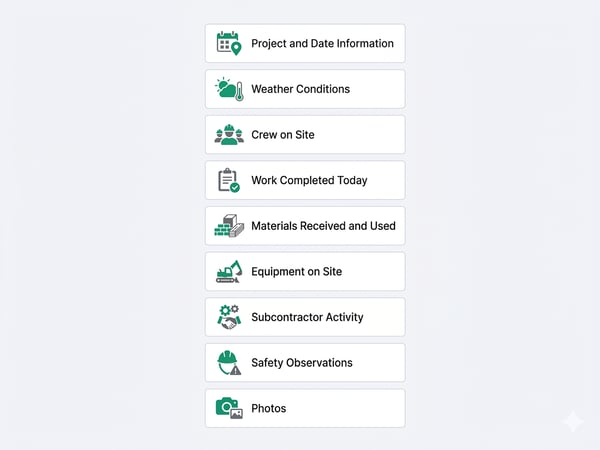
- A complete daily report has 9 core sections: date/weather, crew, work completed, materials, equipment, subcontractors, safety, issues/delays, and photos
- Reports filed the same day are 3x more defensible in disputes than retroactive logs
- Digital daily reports cut filing time by ~50% and make data searchable across projects
What Is a Construction Daily Report and Why Does It Matter?
A construction daily report (also called a daily log or site report) is a written record of everything that happens on a job site in a single day — who worked, what was completed, what materials arrived, what issues occurred, and what the weather was. Every GC, site super, and foreman should complete one at the end of every working day.
The reports serve four critical functions:
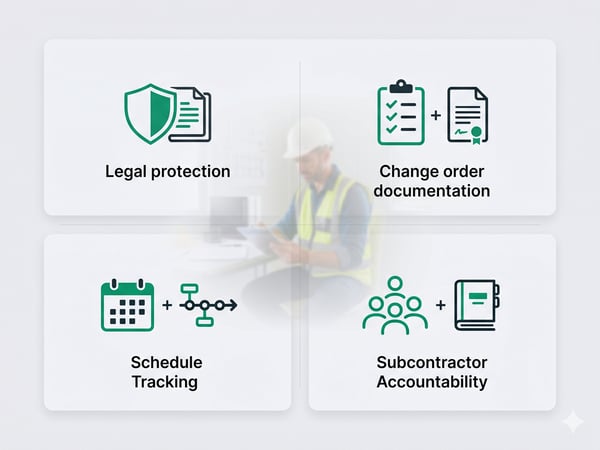
- Legal protection — If a client disputes when work was done, a timestamped daily log is your best evidence
- Change order documentation — Extra work is only billable if it's documented on the day it happened
- Schedule tracking — Daily progress records show exactly when delays began and what caused them
- Subcontractor accountability — A log of who was on site (and when) eliminates "we were never told" disputes
Our finding: The contractors who get the most value from daily reports aren't using them to track progress — they're using them as dispute-prevention tools. A single documented delay, with weather data and crew counts attached, can save tens of thousands in a contract dispute. The report pays for itself the first time you need it.
Daily reports sit inside a broader project management workflow. See our guide to best construction project management software for tools that make daily reporting faster and automatically organized by project.
Construction Daily Report Template: All 9 Sections
Section 1: Project and Date Information
|
Field |
Example |
|
Project name |
Riverside Kitchen Remodel |
|
Project address |
142 Oak Street, Austin TX |
|
Report date |
April 15, 2026 |
|
Report number |
#047 |
|
Prepared by |
Mike Torres, Site Foreman |
|
General contractor |
Torres Construction LLC |
|
Owner / client |
J. and P. Rivera |
Why it matters: Report numbers create a continuous sequence — missing numbers signal gaps in documentation.
Section 2: Weather Conditions
|
Field |
Example |
|
Morning temperature |
58°F |
|
Afternoon temperature |
72°F |
|
Conditions |
Partly cloudy, light wind |
|
Precipitation |
None |
|
Weather impact on work |
None — full productivity |
Tip: If weather caused any delay, note the specific hours lost and trades affected. This is essential for time extension claims.
Section 3: Crew on Site
|
Name |
Trade / Role |
Company |
Hours on Site |
|
Mike Torres |
Foreman / GC |
Torres Construction |
10 |
|
Luis Reyes |
Carpenter |
Torres Construction |
10 |
|
Ana Vega |
Tile setter |
Sub — Vega Tile |
8 |
|
Tom Hill |
Electrician |
Sub — Hill Electric |
6 |
Total crew hours today: 34
Our finding: Crew counts are the most frequently referenced section during billing disputes. Log names, not just headcounts.
Section 4: Work Completed Today
Be specific — "framing" is not enough. Write what was framed, where, and to what stage.
- Completed rough framing of master bathroom addition (north wall and ceiling joists)
- Tile installation: 60% complete on kitchen floor (120 of 200 sq ft)
- Rough electrical: all outlets and switches rough-in complete in addition zone
- Inspected and approved: structural framing by county inspector (permit #2026-0441)
Section 5: Materials Received and Used
|
Material |
Quantity |
Supplier |
PO # |
Used / Stored |
|
Cement board |
40 sheets |
BuildPro Supply |
PO-2026-188 |
30 used, 10 stored |
|
Tile adhesive |
6 bags |
BuildPro Supply |
PO-2026-188 |
4 used, 2 stored |
|
12/2 Romex wire |
250 ft |
Hill Electric |
— |
210 ft used |
Note any damaged or rejected materials — this becomes your basis for a supplier claim if quality issues arise later.
For contractors using estimating software, daily material usage logs feed directly back into cost-tracking. See our AI construction estimating software guide for tools that integrate material tracking with daily reporting.
Section 6: Equipment on Site
|
Equipment |
Status |
Hours Used |
Idle Hours |
Notes |
|
Skid steer |
Active |
6 |
0 |
— |
|
Concrete mixer |
Active |
4 |
0 |
— |
|
Scissor lift |
Idle |
0 |
8 |
Return tomorrow |
Section 7: Subcontractor Activity
|
Subcontractor |
Trade |
Crew Size |
Work Performed |
Issues |
|
Vega Tile |
Tile |
1 |
Kitchen floor 60% complete |
None |
|
Hill Electric |
Electrical |
1 |
Rough-in complete, addition zone |
Awaiting panel upgrade |
Section 8: Safety Observations
- Toolbox talk: Ladder safety and fall prevention (10 min, all crew present)
- PPE compliance: 100% — hard hats, safety glasses, hi-vis worn
- Incidents / near-misses: None
- Hazards identified: Open trench on north side — barricaded and flagged
- First aid: None required
The construction industry recorded 1,032 fatal work injuries in 2024 (BLS CFOI, 2024) — safety documentation is not optional. For PPE requirements by tool type, see our list of essential construction tools.
Section 9: Issues, Delays, and Open Items
|
# |
Issue |
Impact |
Action Required |
Owner |
Status |
|
1 |
Electrical panel upgrade delayed — utility backlog |
+5 day delay |
Request time extension |
Torres |
Open |
|
2 |
Tile color mismatch — wrong batch delivered |
1-day delay |
Supplier notified, reorder |
Vega Tile |
In progress |
Rule: Any issue causing a delay of more than 2 hours gets its own line. No exceptions.
Section 10: Photos
Attach 3–10 photos per report. Mandatory subjects:
- Work completed (progress shots, not posed)
- Any damage, defects, or material issues
- Safety hazards identified
- Deliveries received
- Inspections passed
Naming convention: [ProjectName]-[Date]-[Description].jpg
Complete Daily Report Template (Copy-Ready)
CONSTRUCTION DAILY REPORT
Project: _______________________ Report #: _______
Address: _______________________ Date: ___________
Prepared by: ___________________ GC: _____________
--- WEATHER ---
AM Temp: ___ PM Temp: ___ Conditions: ___________
Precipitation: ___ Weather impact: ________________
--- CREW ON SITE ---
Name | Trade | Company | Hours
_____|_______|_________|______
Total crew hours: ___
--- WORK COMPLETED ---
•
•
•
--- MATERIALS RECEIVED ---
Material | Qty | Supplier | PO# | Used/Stored
_________|_____|__________|_____|____________
--- EQUIPMENT ---
Equipment | Status | Hours Used | Idle | Notes
__________|________|____________|______|______
--- SUBCONTRACTORS ---
Company | Trade | Crew Size | Work Done | Issues
________|_______|___________|___________|_______
--- SAFETY ---
Toolbox talk: ___________ PPE compliance: ____%
Incidents/near-misses: _________________________
Hazards identified: ____________________________
--- ISSUES / DELAYS ---
# | Issue | Impact | Action | Owner | Status
__|_______|________|________|_______|_______
--- PHOTOS ATTACHED ---
Count: ___ Subjects: ______________________________
Signature: _____________________ Time: __________
How to Turn Daily Reports Into a Consistent Habit
The biggest challenge isn't the template — it's consistency. Most job sites start strong and drift toward weekly summaries within a month.
Set a hard end-of-day rule. Reports must be submitted before the last person leaves site. A report written at 5:30pm is accurate. One written Friday morning about Wednesday is not.
Make it mobile. Paper reports get lost and filled out illegibly. A phone-based form takes 8–12 minutes and stores automatically. See our construction project management software guide for platforms with built-in daily reporting tools.
Pre-populate what you can. Project name, date, address, and crew roster shouldn't be retyped each day. Templates with auto-fill save 3–5 minutes per report.
Review reports weekly. A daily report nobody reads is busywork. PMs should review each Monday, flag open issues, and confirm documented delays have been communicated to the client.
Paper vs. Digital Daily Reports
|
Paper |
Digital |
|
|
Time to complete |
15–25 min |
8–12 min |
|
Searchable across projects |
No |
Yes |
|
Photo attachment |
Stapled / separate |
Embedded inline |
|
Risk of loss / damage |
High |
Near zero |
|
Startup cost |
$0 |
$49–$199/mo (PM tool) |
For small contractors not yet using PM software, a Google Form that auto-populates a Google Sheet is a free halfway solution — it at least timestamps and centralizes reports.
What Happens When You Skip a Daily Report?
Skipping even one day creates a documentation gap that's very hard to close:
- A sub claims 3 days on site — your log shows 2. No report = no proof.
- A client disputes a 5-day delay. No same-day weather record. The dispute drags on.
- An OSHA inspection follows a near-miss. No safety records. That's not an acceptable answer.
- A change order gets disputed. No daily log for the date in question. Hard to defend.
Every missed report is a future risk you're carrying for free today.
Relevant Article:Spring Ramp-Up: The 15‑Minute Daily Jobsite Update That Prevents Schedule Slip
Frequently Asked Questions
Who should fill out a construction daily report?
The site foreman or superintendent is responsible on most projects. On solo or small-crew operations, the GC fills it out. It should never be delegated to someone who wasn't on site that day.
How long should you keep construction daily reports?
Minimum 7 years — this covers most statutes of limitations for construction defect claims (3–10 years depending on state). Store digital copies in at least two locations. Some states require longer retention for public projects.
Does a daily report replace a construction schedule?
No — they serve different purposes. A schedule shows what should happen. A daily report shows what actually happened. Schedule deviations show up first in daily reports. See our construction project management software guide for tools that link daily reports to live schedules.
Can I use this template for any project type?
Yes, with minor customization. All 9 core sections apply to residential renovation, commercial construction, and infrastructure projects. Service contractors like pressure washers use a simplified version — see our pressure washing contracts template for how service contractors document field work.
What's the difference between a daily report and a progress report?
A daily report covers one day in operational detail. A progress report is a periodic summary (weekly or monthly) sent to owners showing schedule status, budget vs. actual, and milestone completion. Daily reports feed the data that progress reports summarize.
Conclusion
A construction daily report isn't paperwork for its own sake — it's the paper trail that pays you back the first time something goes wrong. Same-day reports filed consistently are nearly 6x more defensible in disputes than retroactive summaries.
Use the template above, make it mobile, and set a non-negotiable end-of-day submission rule. Ten minutes per day is a small price for the protection it provides.
For more contractor operations resources, see our house renovation business plan guide for a full operations plan framework, and our list of essential construction tools for job-site equipment checklists.
Sources: FMI/Autodesk Construction Disconnected 2023 · BLS Census of Fatal Occupational Injuries 2024