
Managing construction schedules, crews, and documentation is no small task—especially when Bolt...
Related Articles
Effective project management is the backbone of successful construction and fieldwork. Whether you're building homes, managing remodels, or handling large-scale developments, real-time project updates and organized documentation are critical to keeping everything on track.
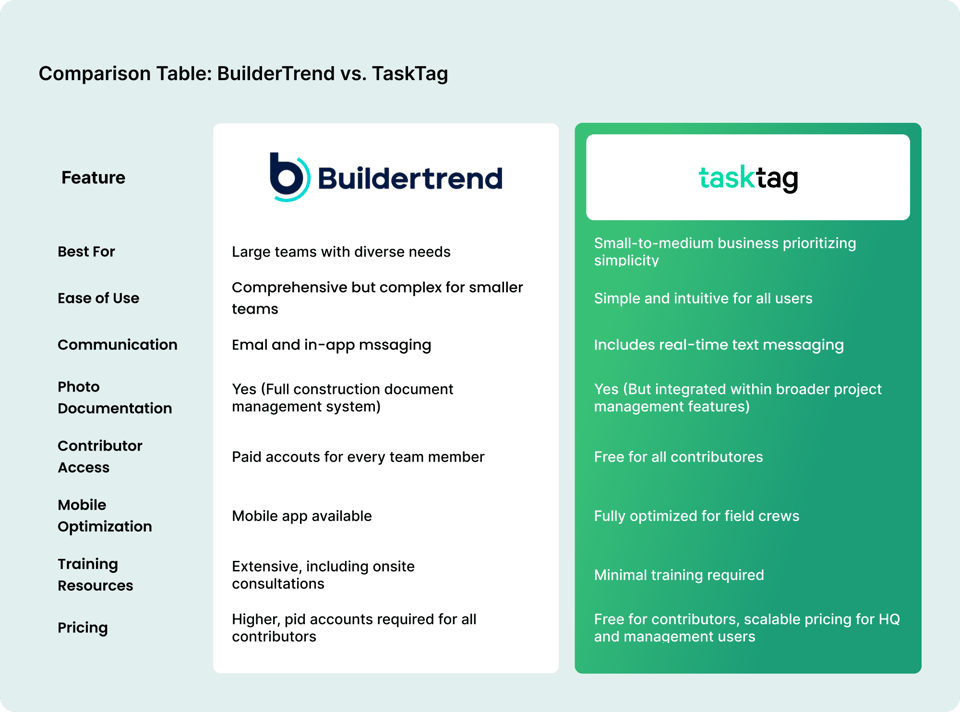
Enter Buildertrend and TaskTag — two cloud-based construction management software tools designed to address these challenges, but with very different approaches. While Buildertrend offers a comprehensive suite of features for large teams, TaskTag focuses on cost-effective simplicity, field-first communication, and affordability for contractors of every size. 🆕
This guide breaks down both tools across features, pricing, and real-world fit — so you can make the right call for your team.
Related: Top 5 Buildertrend Alternatives for Construction Project Management
Quick Comparison: TaskTag vs Buildertrend at a Glance
|
Feature |
Buildertrend |
TaskTag |
|
Task Management |
✅ Advanced |
✅ Full |
|
Team Chat |
⚠️ Basic messaging |
✅ Project threads + DMs |
|
Photo Documentation |
✅ Yes |
✅ Yes + hashtag auto-filing |
|
GPS Time Tracking |
⚠️ Add-on |
✅ Built-in |
|
Client Portal |
✅ Paid tier |
✅ Free for clients |
|
Financial Management |
✅ Full (budgets, bids, POs) |
⚠️ Basic |
|
Free Contributor Access |
❌ Everyone pays |
✅ Only HQ pays |
|
Mobile App |
✅ iOS & Android |
✅ iOS & Android |
|
Offline Mode |
✅ |
✅ |
|
Best For |
Large teams, 50+ homes/year |
Small–mid contractors, field crews |
|
Starting Price |
$99+/month |
$16/user/month (annual) |
|
Free Plan |
❌ |
✅ 3 projects, full features |
Buildertrend: A Comprehensive Construction Management Suite
Purpose and Key Features
Buildertrend is often described as an all-in-one construction management platform. It caters to general contractors, remodelers, and homebuilders by providing tools that streamline every stage of the construction process — from sales and project management to financial tracking and client communication.
Pros of Buildertrend
Comprehensive Platform Buildertrend stands out as a comprehensive platform, offering an all-in-one solution that covers every aspect of construction management. From project scheduling and document management to bid management and invoicing, Buildertrend ensures that no detail is overlooked. The platform also includes client portals, providing transparency that keeps clients informed and builds trust throughout the project lifecycle. This extensive suite of features makes Buildertrend an excellent choice for large teams with diverse and complex needs.
Strong Customer Support and Training In addition to its robust functionality, Buildertrend offers strong customer support and training resources to help users get the most out of the platform. Whether you're looking for help articles, onboarding guides, or access to training academies, Buildertrend provides a wealth of options to ensure a smooth implementation. For larger teams, onsite consultations are also available to address specific needs.
Focus on Financial Management Where Buildertrend truly shines is in its financial management tools. Users can seamlessly handle budgets, bids, purchase orders, invoices, and payments all within the platform. This focus on financial organization makes it a powerful tool for teams that need to manage intricate budgets and ensure financial accountability across projects.
Cons of Buildertrend
Higher Cost Buildertrend's comprehensive features come at a premium, making it a costly option for teams — especially those with a large number of contributors. Since every team member needs a paid account, the expenses can quickly add up, posing a challenge for businesses trying to manage their budget effectively.
Overwhelming for Small Teams (Under 50 homes/year) Smaller teams may find Buildertrend's extensive features overwhelming. While its depth is an asset for larger operations, it can introduce unnecessary complexity for businesses that don't require such a robust solution. For these teams, the platform may feel more like an over-engineered tool than a workflow simplifier. If you're experiencing this, it may be time to look at leaner Buildertrend alternatives.
No Free Contributor Access Every subcontractor, vendor, and client who needs to see project updates requires a paid seat. For teams that regularly bring in rotating subs or need client visibility, this creates significant per-user cost pressure — and this is exactly where TaskTag wins.
TaskTag: A Cost-Effective and Inclusive Solution
Purpose and Key Features
TaskTag focuses on simplicity and affordability, offering a streamlined platform that prioritizes communication, documentation, and task management. Its unique approach makes it accessible for teams of all sizes, especially those looking for an easy-to-use, cost-effective solution.
Pros of TaskTag
Affordable and Scalable TaskTag delivers essential construction project management tools at a fraction of the cost. With no steep learning curve, it's ideal for smaller businesses or subcontractors who need to get up and running fast — watch mobile onboarding tutorials here.
Free Contributor Access Unlike Buildertrend, TaskTag allows contributors to join for free. Only the main account (e.g., headquarters) needs a paid subscription. This feature transforms the platform into a collaborative hub — similar to a social network for your team — letting subcontractors, vendors, and clients collaborate without adding to your monthly bill.
Enhanced Communication TaskTag integrates text-style messaging for real-time updates, allowing teams to communicate on a platform they're already familiar with. This ensures faster responses and fewer missed updates. Project-specific threads mean no more lost messages across scattered texts.
Built-In GPS Time Tracking Unlike Buildertrend (where time tracking is an add-on), TaskTag includes GPS-verified clock in/out and payroll-ready timesheet exports at no extra cost — critical for contractors who need to verify who was on-site and when.
Photo Documentation with Hashtag Auto-Filing TaskTag's photo documentation goes beyond storage — photos tagged with #ProjectName automatically file themselves to the right project thread, keeping before & after progress, delivery proof, and punch list photos organized without manual sorting.
Ease of Use TaskTag enables teams to instantly share project updates with clients, buyers, and vendors with minimal onboarding and training. Smart tags auto-assign tasks, and checklists keep field work on track without needing a dedicated project manager to manage the software.
Customer Testimonials
"TaskTag helps us stay organized with projects and tagging. It's like having a searchable database for everything we need — from group communication to tracking progress. Our team runs so much smoother now!" — Rob, Superintendent
More contractor success stories:
- How Sosa Construction Solved Their Communication Headaches
- How TaskTag Streamlined Project Management for InTown Homes
- How TaskTag Transformed Dom's Workshop into a Remodeling Powerhouse
-
Case Study: How PD Castone Streamlined Construction Management with TaskTag
Pricing Comparison: Buildertrend vs TaskTag
This is where the difference becomes very real for small and mid-size contractors.
|
Plan |
Buildertrend |
TaskTag |
|
Starting Price |
$99+/month (flat, limited users) |
$16/user/month (annual) |
|
Free Plan |
❌ None |
✅ 3 projects, full features |
|
Subcontractor Access |
💰 Paid seat required |
✅ Free contributor access |
|
Client Access |
💰 Client portal (paid tier) |
✅ Free, no login needed |
|
Time Tracking |
⚠️ Add-on cost |
✅ Included |
|
5-User Annual Cost |
~$1,188+/year |
$960/year |
|
10-User Annual Cost |
Higher tiers required |
$1,920/year |
|
What's Included |
Full PM suite (complex) |
Photos + Tasks + Chat + Timesheets |
The key difference: Buildertrend prices by tier (limiting users per plan), while TaskTag charges a transparent $16/user/month. For teams where subcontractors and clients also need visibility, TaskTag's free contributor model saves thousands annually — without sacrificing core field management capabilities.
Feature-by-Feature Deep Dive
Task Management
Buildertrend: Robust scheduling, Gantt charts, task dependencies — powerful for complex multi-phase projects. TaskTag: Full task creation, crew assignment, checklists, due dates, completion tracking — built for field speed, not office complexity. Winner for small–mid contractors: TaskTag. Faster to adopt, no training curve.
Team Communication
Buildertrend: Internal messaging and client portals, but conversation threads can be fragmented. TaskTag: Chat-first interface with project-specific threads, direct messages, and hashtag organization. Works like texting — zero learning curve. Winner: TaskTag. Field crews adopt it immediately.
Time Tracking
Buildertrend: Available as a paid add-on; solid job costing integration. TaskTag: GPS-verified clock in/out with location verification and payroll-ready timesheet exports — included in the base plan. Winner: TaskTag on value. Buildertrend wins on job costing integration if you need that depth.
Photo Documentation
Buildertrend: Photo uploads and storage with project tagging. TaskTag: GPS-timestamped photos with hashtag auto-filing, before & after workflows, and punch list photo tracking. Winner: TaskTag for field documentation. Buildertrend for document management.
Change Orders
Buildertrend: Full change order management with client approval workflows. TaskTag: Change order tracking via tasks and photo documentation — simpler but effective for most field crews. Winner: Buildertrend for complex change order workflows. TaskTag for quick field-level tracking.
Client Collaboration
Buildertrend: Dedicated client portal — excellent visibility but requires paid tier. TaskTag: Free client access — clients see real-time project updates, photos, and progress with no login or paid seat required. Winner: TaskTag on cost. Buildertrend on depth.
Subcontractor Management
Buildertrend: Robust sub management with compliance tracking. TaskTag: Subcontractor compliance tracking, free contributor access for subs, and permit/inspection tracking — at no extra per-seat cost. Winner: Tie — Buildertrend deeper, TaskTag more affordable.
The Right Project Management Tool For You
Both Buildertrend and TaskTag are capable tools — they just serve different teams.
Choose Buildertrend if:
- You're a large company (50+ homes/year) with diverse, complex project needs
- Financial management — budgets, bids, purchase orders, invoicing — is a top priority
- You have the budget for premium per-user pricing and onboarding investment
- You need deep Gantt scheduling and enterprise-level change order workflows
Choose TaskTag if:
- You're a small-to-mid-size contractor looking for a cost-effective, easy-to-use tool that prioritizes communication and field documentation 🆕
- You want free contributor access for subs, vendors, and clients — without paying per seat
- You need GPS time tracking and photo documentation built in, not bolted on
- You're tired of juggling multiple apps and want one place for photos, tasks, chat, and timesheets 🆕
- You want your field crew to actually adopt the tool — without a training program 🆕
Frequently Asked Questions: TaskTag vs Buildertrend
Q: Is TaskTag cheaper than Buildertrend? Yes — significantly. TaskTag starts at $16/user/month (annual) with a free plan available. Buildertrend starts at $99+/month and scales up quickly as team size grows. For a 5-person crew, TaskTag costs ~$960/year vs. Buildertrend's $1,188+/year — and TaskTag's free contributor access means subcontractors and clients don't add to that cost.
Q: Does TaskTag have a free plan? Yes. TaskTag offers a free plan with 3 active projects and full feature access — photos, tasks, team chat, and file storage. Buildertrend has no free plan. See TaskTag pricing →
Q: Does TaskTag include time tracking like Buildertrend? TaskTag includes GPS-verified time tracking with clock in/out, location verification, and payroll-ready exports — included in the base plan. Buildertrend offers time tracking as a paid add-on.
Q: Can subcontractors use TaskTag for free? Yes. TaskTag's free contributor model means subcontractors, vendors, and clients can collaborate on your projects at no extra cost. Only your HQ account pays. Buildertrend requires a paid seat for every user.
Q: What are the best Buildertrend alternatives? If Buildertrend feels too complex or expensive, the top alternatives include TaskTag (best for field-first teams), Jobber, Houzz Pro, and Manifold. See the full list: Top 5 Buildertrend Alternatives
Q: How hard is it to switch from Buildertrend to TaskTag? Much easier than you'd expect. TaskTag's interface works like texting — minimal training required. Watch mobile onboarding tutorials → and web tutorials →. Most teams are up and running within a day.
🔍 Have questions about switching from Buildertrend? 🆕 👉 Book a Free 10-Minute Demo — Ask anything, no commitment.
Related Articles
- Top 5 Buildertrend Alternatives for Construction Project Management
- Best Construction Software for General Contractors in 2026
- Why Construction Teams Struggle with Too Many Tech Tools
- Ditch the Paper Timecards: TaskTag Timesheets Is Here
- How to Convince Your Team to Switch to TaskTag
- Stuck With the Wrong Tool? 5 Signs It's Time to Switch to TaskTag
- Do You Really Need 3 Apps to Do 1 Job?
.png?height=200&name=manifold%20(1).png)