


98% of megaprojects finish over schedule or over budget (McKinsey, 2023). For residential and commercial contractors, schedule slippage is the most reliable predictor of every other project problem: cost overruns, subcontractor disputes, client dissatisfaction, and withheld final payments.
Key Takeaways
- 98% of large construction projects run over schedule or budget — the root cause is almost always planning gaps, not execution (McKinsey, 2023)
- A reliable schedule has 5 components: work breakdown structure, duration estimates, trade sequencing, float/buffer, and milestone triggers
- Schedule slippage compounds — a 3-day delay in week 2 typically produces a 10–15 day delay by project end if uncorrected
- Contractors who share the schedule with all subs from day one finish 2.3 weeks faster on average
Why Construction Schedules Fail (And It's Not Weather)
The most common explanation for schedule failures is weather or difficult clients. These are real factors — but rarely the root cause. The underlying driver is a schedule that was never realistic to begin with.
A schedule built backward from a desired end date, with no float and no trade input, is a wish list. When the first trade runs two days late, there's no buffer. The delays cascade.
The other major failure mode: a schedule created in week one and never updated.
Our finding: The contractors who consistently finish on schedule aren't better at predicting how long work takes — they're better at catching slippage early. A 3-day delay identified in week 2 costs 1–2 days to recover. The same delay identified in week 5 costs 2–3 weeks because downstream trades have already scheduled around the original date.
For how schedule performance affects your cash flow and payment cycle, see our house renovation business plan guide.
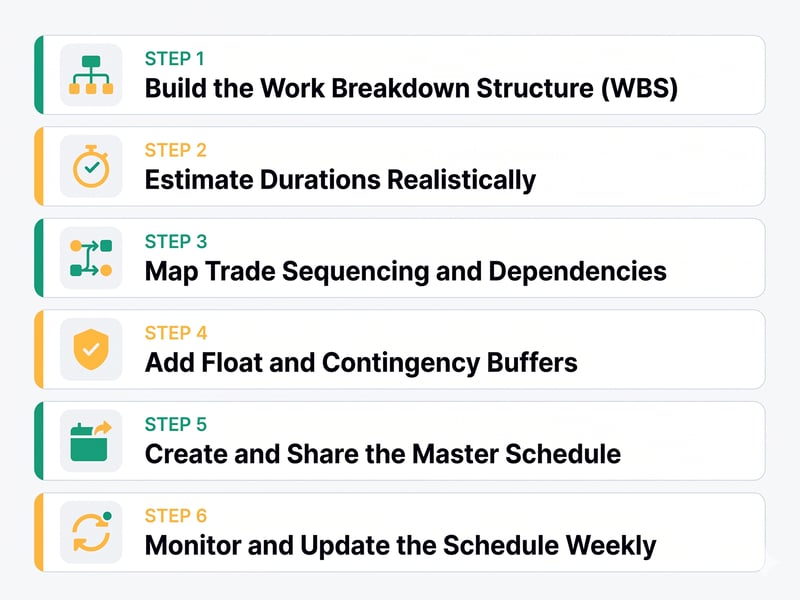
Step 1: Build the Work Breakdown Structure (WBS)
Before you schedule anything, list every task the project requires. Most contractors skip this and jump to a timeline. That's why schedules miss things.
Break the project into phases, then into specific tasks:
Phase 1 — Pre-Construction: Permits, contracts signed, subs contracted, long-lead items ordered, site access confirmed
Phase 2 — Demo: Site protection, interior/exterior demo, debris removal, hazmat abatement if required
Phase 3 — Rough Work: Foundation/structural, rough framing, rough plumbing, rough electrical, rough HVAC, insulation, rough-in inspections
Phase 4 — Close-Up: Drywall hang, tape, finish coats, prime
Phase 5 — Finish Work: Paint, tile, flooring, trim, cabinets, countertops, finish plumbing, finish electrical, HVAC finish, fixtures
Phase 6 — Closeout: Final inspections, punch list, site cleanup, owner sign-off
Rule: Every task should be assignable to one person and completable in 1–5 days. Tasks larger than 5 days get broken down further.
Step 2: Estimate Durations Realistically
The most common scheduling error is duration optimism — estimating at best-case speed with a full crew and no interruptions.
The Three-Point Duration Estimate
|
Estimate |
Definition |
Weight |
|
Optimistic (O) |
Best case — everything goes right |
1× |
|
Most Likely (M) |
Normal pace, typical conditions |
4× |
|
Pessimistic (P) |
Realistic problems occur |
1× |
PERT formula: Duration = (O + 4M + P) ÷ 6
Example — rough electrical for a kitchen addition:
- Optimistic: 1.5 days | Most Likely: 2.5 days | Pessimistic: 4 days
- PERT: (1.5 + 10 + 4) ÷ 6 = 2.6 days → schedule 3 days
Material Lead Times Are Tasks Too
Order long-lead items the day the contract is signed:
- Custom cabinets: 4–8 weeks
- Countertops (template to install): 2–3 weeks after cabinet install
- Windows (custom): 3–6 weeks
- Appliances (specific models): 2–8 weeks
Missing a cabinet delivery date is the single most common cause of a residential schedule falling apart in the finish phase.
Step 3: Map Trade Sequencing and Dependencies
Every task has a dependency relationship with other tasks. Mapping these turns a task list into a schedule.
|
Dependency Type |
Meaning |
Example |
|
Finish-to-Start (FS) |
B can't start until A finishes |
Drywall can't start until rough-in inspection passes |
|
Start-to-Start (SS) |
B can start when A starts |
Rough plumbing and electrical can overlap |
|
Finish-to-Finish (FF) |
B must finish when A finishes |
Paint prep and primer finish together |
Critical Path
The critical path is the longest chain of dependent tasks — it determines minimum project duration. Any delay to a critical path task delays the entire project.
Tasks not on the critical path have float — time they can slip without affecting the end date. Critical path tasks get daily attention; tasks with significant float get weekly checks.
Typical residential critical path:
Demo → Framing → Rough-in → Inspections → Drywall → Paint → Cabinets → Countertops → Final inspections → Punch list
Step 4: Add Float and Contingency Buffers
A schedule with zero float guarantees lateness. Plan for reality.
Project buffer: Place a time reserve at the project end equal to 10–15% of total project duration:
- 6-week project → 4–5 day buffer
- 12-week project → 8–10 day buffer
- 6-month project → 2–3 week buffer
Don't show the client the buffer. Present the buffered date as your committed completion date. The buffer is your management tool.
Feed buffers: Where two work streams merge (e.g., cabinet delivery + finish carpentry must both complete before countertop install), place a 2–3 day feed buffer before the merge point.
Step 5: Create and Share the Master Schedule
A construction schedule needs to be accurate, shared, and actively maintained — not elaborate.
PROJECT SCHEDULE
Project: ___________________ Start: ___________
Target End: ________
Committed End: _____
PHASE / TASK RESPONSIBLE START END DAYS STATUS
PRE-CONSTRUCTION
Permits GC Apr 22 May 2 10 In progress
Long-lead orders GC Apr 22 Apr 22 1 ⚠ Order NOW
DEMO
Interior demo GC Crew May 5 May 8 4 Not started
Debris removal GC Crew May 8 May 9 1 Not started
ROUGH WORK
Rough framing GC Crew May 9 May 16 7 Not started
Rough plumbing Sub: Plumb May 16 May 20 4 Not started
Rough electrical Sub: Elec May 16 May 21 5 Not started
HVAC rough-in Sub: HVAC May 19 May 22 3 Not started
Rough inspections Inspector May 27 May 27 1 Not started
CLOSE-UP
Drywall Sub: DW May 28 Jun 7 8 Not started
FINISH WORK
Paint GC Crew Jun 9 Jun 12 4 Not started
Tile Sub: Tile Jun 10 Jun 17 7 Not started
Flooring Sub: Floor Jun 17 Jun 20 4 Not started
Cabinets Sub: Cab Jun 24 Jun 27 4 Not started
Countertops Sub: CT Jul 11 Jul 12 2 Not started
Finish plumbing Sub: Plumb Jul 8 Jul 10 3 Not started
Finish electrical Sub: Elec Jul 8 Jul 10 3 Not started
CLOSEOUT
Final inspections Inspector Jul 15 Jul 16 2 Not started
Punch list GC+Client Jul 17 Jul 21 4 Not started
Final sign-off GC+Client Jul 22 Jul 22 1 Not started
PROJECT BUFFER: Jul 22 Jul 28 4
COMMITTED COMPLETION: Jul 28
Share with: every subcontractor (their start date and predecessor), the client (phases and milestones only), materials suppliers (delivery dates), and inspectors (pre-schedule windows).
Sub kickoff meeting: Before work begins, 30 minutes with all major subs — walk the sequencing map, confirm each sub knows who precedes them and what site conditions they'll inherit.
For keeping subs accountable to the schedule, daily documentation is your enforcement. See our construction daily report template — logging actual vs. planned progress daily creates the early warning system that prevents small slips from becoming large delays.
Step 6: Monitor and Update the Schedule Weekly
The schedule you build before the project starts is a forecast, not a contract. Update it as reality unfolds.
Monday Morning Schedule Review (15 minutes)
- Mark actual completion dates for tasks finished last week
- Calculate slippage — how many days behind plan on each active task?
- Assess downstream impact — does slippage affect the critical path?
- Adjust upcoming task dates accordingly
- Notify any sub whose start date has moved
The 2-Day Rule
Any task 2+ days behind its planned completion triggers immediate action:
- Identify the cause
- Determine if it's recoverable (Saturday work? Overlap a parallel task?)
- If the critical path is affected, communicate to the client immediately
Clients told early about delays adapt. Clients who discover delays at the expected completion date dispute. For managing the sub coordination that keeps your schedule intact, see our how to manage subcontractors guide.
Common Construction Scheduling Mistakes
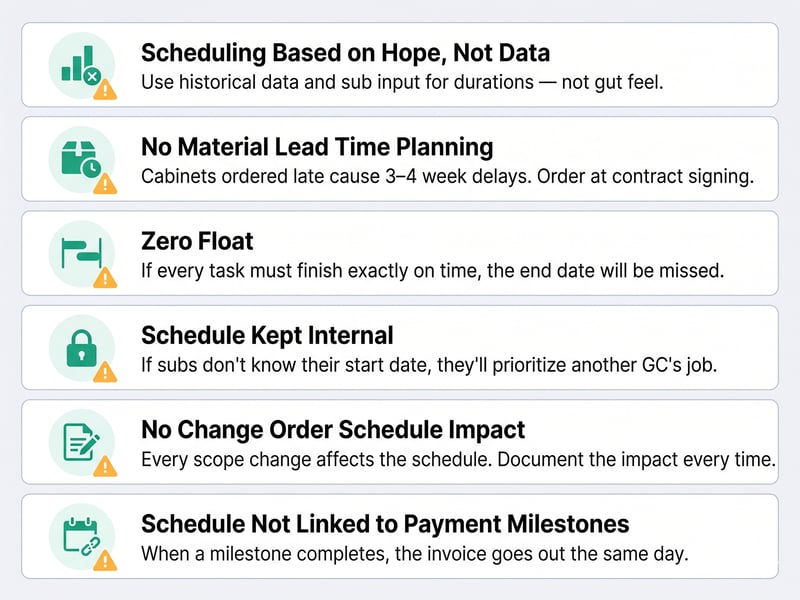
- Scheduling based on hope, not data. Use historical project data and sub input for durations — not gut feel.
- No material lead time planning. Cabinets ordered in week 3 when needed in week 6 cause 3–4 week delays. Order at contract signing.
- Zero float. If every task must finish exactly on time to hit the end date, the end date will be missed.
- Schedule kept internal. If subs don't know their start date, they'll prioritize another GC's job. Share it.
- No change order schedule impact assessment. Every scope change affects the schedule. Document the impact in every change order. See our construction change order template.
- Schedule not linked to payment milestones. When a milestone completes, the invoice goes out the same day. See our contractor invoice template for the milestone billing structure that integrates with your project timeline.
Relevant Article:How InTown Homes’ Scheduler Keeps Projects on Track with TaskTag
Frequently Asked Questions
What software is best for construction project scheduling?
For small to mid-sized contractors, TaskTag, Jobber, and Buildertrend all offer scheduling tools appropriate to their market. For larger commercial work, Procore and Autodesk Build provide full critical path scheduling. For simple residential projects, a well-structured spreadsheet can be sufficient — the discipline of maintaining it matters more than the tool. See our construction project management software guide for a full comparison.
How do I handle a schedule delay caused by the owner?
Document it immediately as an owner-caused delay and issue written notice the same day. Owner-caused delays (late selections, delayed approvals, restricted access) typically entitle you to a schedule extension and potentially additional costs. Log the cause and impact in your daily report. See our construction daily report template for how to document owner delays in a way that's legally useful.
Should I share the full schedule with the client?
Share a simplified version — major phases, key milestones, and the completion date. Don't show internal float or buffers — clients will fill them with scope additions or treat every slip as a breach. The detailed WBS and float analysis are internal management tools.
How do I recover a schedule that's 2–3 weeks behind?
In order: (1) Add crew or extend hours on critical path tasks. (2) Overlap tasks planned sequentially that can be safely parallelized. (3) Sub out tasks your own crew was handling to free them for critical path work. (4) Have an honest conversation with the client about a revised date. Document the cause, recovery plan, and new date in writing. See our how to manage subcontractors guide for coordinating subs through schedule recovery.
What is a lookahead schedule?
A 2–3 week rolling view of all near-term tasks, updated weekly. More granular than the master schedule — it shows exactly what needs to happen in the next 1
4–21 days, who's responsible, and what must be ready for each task to start. For projects over 8 weeks with multiple concurrent trades, a 3-week lookahead is one of the most effective scheduling tools available.
Conclusion
A construction schedule that holds isn't luck — it's realistic planning, dependency mapping, built-in float, and active weekly management. The same 3-day delay that derails an unmanaged project is a minor correction in a managed one.
Build the WBS before building the timeline. Map dependencies before committing to dates. Share the schedule with every trade before work begins. Update it every Monday. Catch slippage in days, not weeks.
For the full contractor operations toolkit, see our how to manage subcontractors guide for the coordination system that keeps your schedule intact, our construction change order template for documenting scope changes that affect the timeline, and our construction project management software guide for tools that automate schedule tracking and sub communication.
Sources: McKinsey Global Institute — Construction Productivity 2023 · FMI/Autodesk Construction Disconnected 2023 · PMI and AGC construction scheduling standards
.jpg?height=200&name=1%20(53).jpg)

.jpg?height=200&name=1%20(17).jpg)