


Rework and incomplete items cost the global construction industry an estimated $625 billion annually — roughly 9% of total construction spending (Autodesk/FMI Construction Disconnected, 2023). For individual contractors, unmanaged punch lists are one of the top reasons final payment gets delayed by weeks or disputed entirely. A structured punch list template closes that gap: it defines exactly what "done" means before the client walkthrough, not during it.
Key Takeaways
- Rework costs the construction industry ~$625B annually — punch lists are the primary closeout control (Autodesk/FMI, 2023)
- A complete punch list has 6 core sections: project info, interior, exterior, MEP, site cleanup, and sign-off
- The pre-walkthrough internal inspection catches 60–70% of items before the client sees them
- Digital punch lists reduce closeout time by 28% vs. paper (Procore, 2024)
What Is a Construction Punch List and When Do You Use One?
A construction punch list is a documented list of items that must be completed, corrected, or touched up before a project reaches substantial completion and final payment is released.
When to create one: Start during the final 10–15% of the project — not during the client walkthrough. Contractors who create the list in real time during a walkthrough are at a disadvantage: the client sets the scope, tone, and standard.
Who owns it: The GC owns the punch list process. Individual subs are responsible for their items, but the GC is accountable for overall completion and sign-off.
Our finding: The most common punch list mistake isn't failing to complete items — it's failing to define "complete." Scope ambiguity causes more payment disputes than actual incomplete work. Define acceptance criteria in writing before the walkthrough, ideally in the original contract.
For contract language that sets acceptance standards upfront, see our pressure washing contracts template — the same scope-of-work and acceptance criteria clauses apply to any contractor agreement.
Construction Punch List Template: All 6 Sections
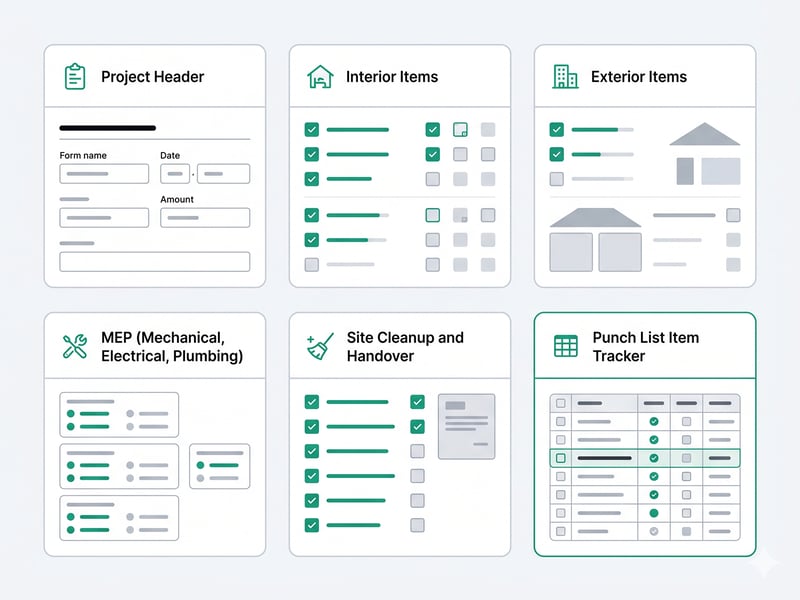
Section 1: Project Header
|
Field |
Detail |
|
Project name |
|
|
Project address |
|
|
Client / owner |
|
|
General contractor |
|
|
Punch list date |
|
|
Target completion date |
|
|
Final payment amount held |
$ |
Section 2: Interior Items
Walls and Ceilings
- not donePaint touch-ups — list specific locations
- not doneDrywall nail pops filled and painted
- not doneNo visible seams at drywall joints
- not doneScrew holes from temporary fixtures patched
Flooring
- not doneTransitions installed and flush at all doorways
- not doneGrout lines complete and consistent color
- not doneNo loose tiles — tap test entire floor
- not doneBaseboards caulked and painted
Doors and Windows
- not doneAll doors open, close, and latch without force
- not doneDoor hardware installed and functioning
- not doneNo paint on glass panes
- not doneWindow locks engage properly
Kitchen (if applicable)
- not doneCabinet doors aligned and hardware installed
- not doneCountertop seams caulked
- not doneAppliances installed, tested, and functioning
- not doneUnder-sink plumbing leak-checked
Bathrooms (if applicable)
- not doneToilet flushes and refills correctly
- not doneNo leaks under vanity or at toilet base
- not doneShower/tub caulk applied and clean
- not doneAll fixtures turned to finger-tight
Trim and Millwork
- not doneCrown molding joints tight and caulked
- not doneNo gaps between trim and wall
- not doneAll trim painted — no bare wood visible
Section 3: Exterior Items
Siding and Façade
- not doneAll penetrations caulked (pipes, wires, vents)
- not doneNo missing or damaged siding panels
- not donePaint coverage complete — no drips or missed areas
Roofing (if in scope)
- not doneNo missing or lifted shingles
- not doneFlashing sealed at all penetrations
- not doneGutters secured and pitched correctly
Concrete, Flatwork, and Grading
- not doneNo cracks exceeding spec (>1/4" on slabs)
- not doneFinal grade slopes away from structure (min 6" drop in 10')
- not doneNo standing water after rain test
Site Restoration
- not doneDisturbed areas regraded and seeded
- not doneAll construction access damage repaired (curbs, sidewalks)
Section 4: MEP (Mechanical, Electrical, Plumbing)
Electrical
- not doneAll outlets and switches operational — use outlet tester
- not donePanel labeled correctly — every breaker identified
- not doneGFCI outlets installed in wet areas and tested
- not doneSmoke and CO detectors installed, tested, and interconnected
- not doneExterior lighting functioning
Plumbing
- not doneAll fixtures flow and drain correctly
- not doneNo visible leaks at supply lines or drain connections
- not doneWater heater operational — temperature set to 120°F
- not doneShut-off valves accessible and functioning
HVAC
- not doneSystem heats and cools to setpoint
- not doneAll registers and returns installed and unobstructed
- not doneFilter installed (new)
- not doneNo unusual noises during operation
Section 5: Site Cleanup and Handover
Cleanup
- not doneAll construction debris removed from site
- not doneInterior vacuumed and surfaces wiped down
- not doneWindows cleaned inside and out
- not doneAll protective coverings removed (floor paper, window film)
- not doneHVAC filters replaced post-construction
Documentation Handover
- not doneAll permits closed and final inspection passed
- not doneCertificate of occupancy delivered to owner
- not doneWarranties for installed products transferred to owner
- not doneAppliance manuals and warranty cards delivered
- not doneSubcontractor warranty contacts list provided
Keys, Codes, and Access
- not doneAll keys returned / rekeyed as agreed
- not doneGarage door and alarm codes reset and provided
- not doneSmart lock codes programmed
Section 6: Punch List Item Tracker
|
# |
Location |
Item Description |
Trade / Owner |
Priority |
Due Date |
Done |
Verified |
|
1 |
Master bath |
Grout missing — NW corner of shower |
Vega Tile |
High |
Apr 17 |
☐ |
☐ |
|
2 |
Kitchen |
Cabinet door misaligned — upper left |
GC |
Medium |
Apr 18 |
☐ |
☐ |
|
3 |
Living room |
Paint touch-up — SW corner by window |
GC |
Low |
Apr 18 |
☐ |
☐ |
|
4 |
Panel |
Breaker #14 unlabeled |
Electrician |
High |
Apr 17 |
☐ |
☐ |
Priority definitions:
- High — Safety issue, code compliance, or blocks CO (24–48 hrs)
- Medium — Visible defect or functional issue (3–5 days)
- Low — Cosmetic (before final walkthrough)
Sign-Off
|
Name |
Signature |
Date |
|
|
GC representative |
|||
|
Client / owner |
|||
|
Second walkthrough required? |
☐ Yes ☐ No |
||
|
Final payment release authorized? |
☐ Yes ☐ No |
Copy-Ready Template
CONSTRUCTION PUNCH LIST
Project: _____________________ List #: _______
Address: _____________________ Date: ________
Client: ______________________ GC: __________
Target completion: ____________ Final payment held: $______
--- INTERIOR ---
Room: _______________
[ ] ___________________________________
[ ] ___________________________________
--- EXTERIOR ---
[ ] ___________________________________
[ ] ___________________________________
--- MEP ---
Electrical: [ ] Outlets tested [ ] Panel labeled [ ] GFCI tested
Plumbing: [ ] No leaks [ ] All fixtures flow [ ] WH set 120°F
HVAC: [ ] Heats/cools [ ] Filter new [ ] No unusual noises
--- SITE CLEANUP ---
[ ] Debris removed [ ] Windows cleaned [ ] Protective film off
[ ] Permits closed [ ] Warranties delivered [ ] Keys/codes transferred
--- ITEM TRACKER ---
# | Location | Item | Owner | Priority | Due | Done | Verified
__|__________|______|_______|__________|_____|______|_________
--- SIGN-OFF ---
GC: __________________ Date: ______
Client: ______________ Date: ______
Final payment authorized: [ ] Yes [ ] No
How to Run a Punch List Process That Gets You Paid on Time
Four stages. Contractors who skip Stage 1 consistently face longer lists and harder negotiations.
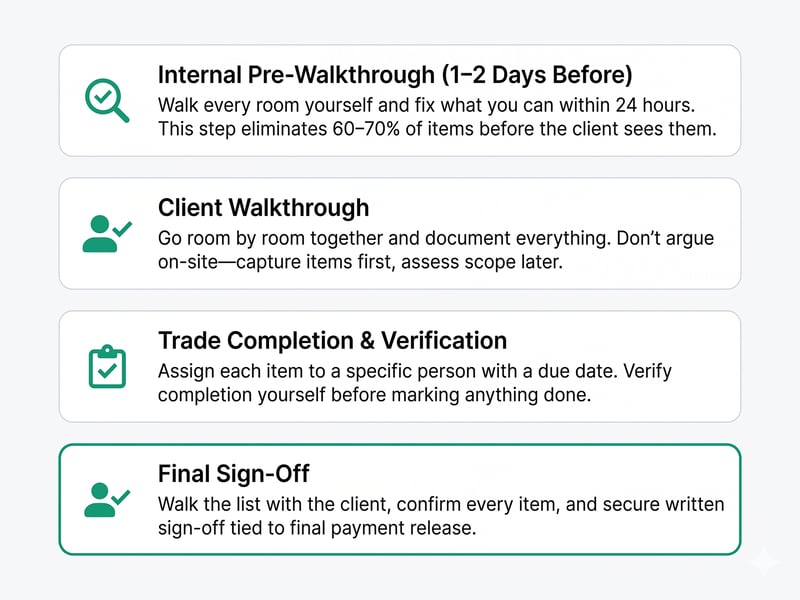
Stage 1 — Internal pre-walkthrough (1–2 days before client walkthrough)
Walk every room yourself first. Fix what you can in 24 hours. This single step eliminates 60–70% of items before the client sees them.
Stage 2 — Client walkthrough
Go room by room together. Never argue during the walkthrough — write everything down, assess scope later. If something is out of scope, note it and address it after in writing.
Stage 3 — Trade completion and verification
Assign every item to a specific person with a due date. Check completion yourself before telling the client it's done.
Stage 4 — Final sign-off
Walk with the client, go through each item, and get written sign-off. Tie payment release to the signed form.
Our finding: Contractors who bring a pre-filled punch list to the walkthrough — showing items they've already identified and corrected — close out faster. It reframes the conversation from "what's wrong?" to "here's what we caught and fixed." That tone shift matters.
For tracking items and assigning them to trades, see our construction project management software guide for platforms with built-in punch list modules.
Punch List vs. Warranty: What's the Difference?
|
Punch List |
Warranty |
|
|
When |
Before substantial completion |
After handover |
|
Scope |
Incomplete or incorrect work |
Defects that develop post-completion |
|
Who pays |
Contractor (in original contract) |
Contractor (per warranty terms) |
|
Timeline |
Days to weeks |
1–2 years typically |
|
Documentation |
Punch list sign-off |
Separate warranty document |
Don't blur the two during the walkthrough. If a client raises something as a punch list item that is actually a warranty claim, address it separately in writing. For contract language that clearly defines warranty scope and exclusions, see our pressure washing contracts template.
Relevant Article:Finding and Succeeding in Subcontractor Construction Jobs
Frequently Asked Questions
What is the difference between a punch list and a snag list?
They're the same thing — "punch list" is the US term, "snag list" is common in the UK and Ireland. Same format, purpose, and process.
How many items should a typical punch list have?
A bathroom renovation might have 10–20 items. A full home renovation or commercial fit-out can have 100–300+. What matters more than the count: every item is specific, assigned to one owner, and has a due date.
Can a client add items after the punch list is signed?
Only if the items were genuinely not visible during the walkthrough. A signed punch list is a legal record of agreed scope. Post-sign-off additions are new scope — handle them with a change order, not a free addition. See our house renovation business plan guide for contract frameworks that protect you here.
Who pays for punch list items?
The GC is responsible at no additional cost — they represent incomplete work already in the original scope. If a sub caused the item, the GC handles it and back-charges the sub per the subcontract. Items outside the original scope are change orders, not punch list items.
How do I handle a client who keeps adding items?
Set a clear walkthrough end date in your contract — one walkthrough within 5–7 days of substantial completion. After that date, new items are warranty claims or change orders. Track all communications in writing. See our construction daily report template for how daily documentation supports these disputes.
Conclusion
A construction punch list isn't a sign the project wasn't done right — it's the professional mechanism that defines "done" for both parties. Contractors who run a structured process close out 3–4 weeks faster than those who handle it informally.
Use the template above, assign every item to one person with one due date, and walk the site yourself before the client does.
For more contractor operations resources, see our construction daily report template for day-to-day site documentation, and our construction project management software guide for tools that manage punch lists, daily reports, and timelines in one place.
Sources: Autodesk/FMI Construction Disconnected 2023 · Procore Closeout Benchmarks 2024


.jpg?height=200&name=1%20(27).jpg)